


Habbo Hotel: Origins
The Keystone beta is open on Steam
Anyone can now try the Keystone client through Steam. Here's how to opt in, what to expect from a beta, and the two badges up for grabs...

In June we introduced Project Keystone, our C++ recreation of the Habbo Hotel: Origins game client. Today the Keystone beta is open to everyone, and you can opt in through Steam.
It's still a beta
Keystone isn't finished yet. You'll find bugs and rough edges, and some things won't behave exactly as they do in the original client. That's what the beta is for. The little details matter, and we know you'll spot things we've missed.
If something goes wrong, you can switch back to the original client at any time.
Open to everyone
The Keystone beta is only available through Steam. We recommend logging in with your Steam account, but you don't have to. You can also use your regular Habbo login and play on your everyday account.
How to join
If Habbo Hotel: Origins isn't in your Steam Library yet, add it from the Steam Store first. It's free.
You'll need this access code. It's one word, all in lowercase:
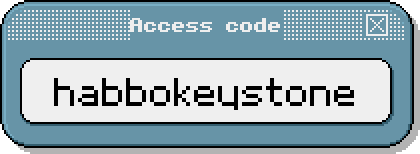
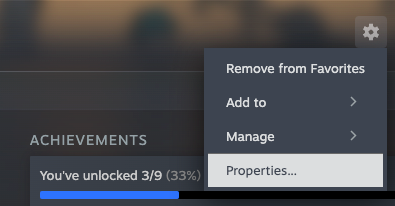
Step 1: In your Steam Library, open Habbo Hotel: Origins. Click the gear icon on the right and choose Properties...
Step 2: Open Game Versions & Betas. Under Private Versions, enter the access code habbokeystone and click Check Code.
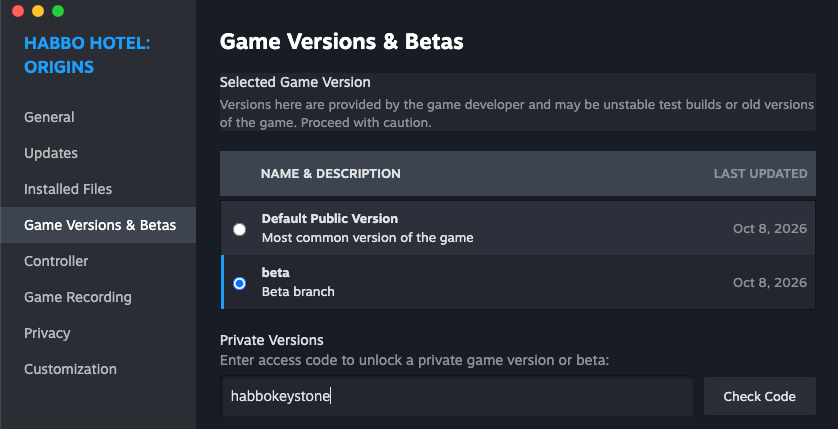
Step 3: Make sure beta is selected in the list. Steam will update the game. When it's done, press Play and log in.
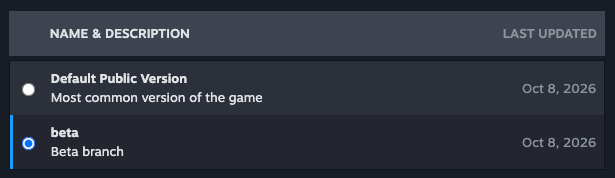
To go back to the original client, return to Game Versions & Betas and select Default Public Version.
Two badges up for grabs


- Grey badge: awarded to everyone who takes part in the beta.
- Colour badge: awarded to everyone who spends more time on the Keystone beta client than on the original client during the beta.
Thank you for helping us test Keystone.
See you in the hotel!
Origins Staff